Printer Test Page PDF
Download any printer test page as a free PDF, no sign-up. Every sheet is a vector PDF in US Letter and A4 with a 100 mm ruler, so you can check it printed at true size. Pick a single PDF test page below, or download all 39 at once as a ZIP.
By Printer Test Page LabLast updated
Download every PDF test page at once
39 PDFs in one ZIP, sorted into folders by type.
All-in-one printer test page PDF
Start here: one sheet that checks color, black, lines and text together.
Color test page
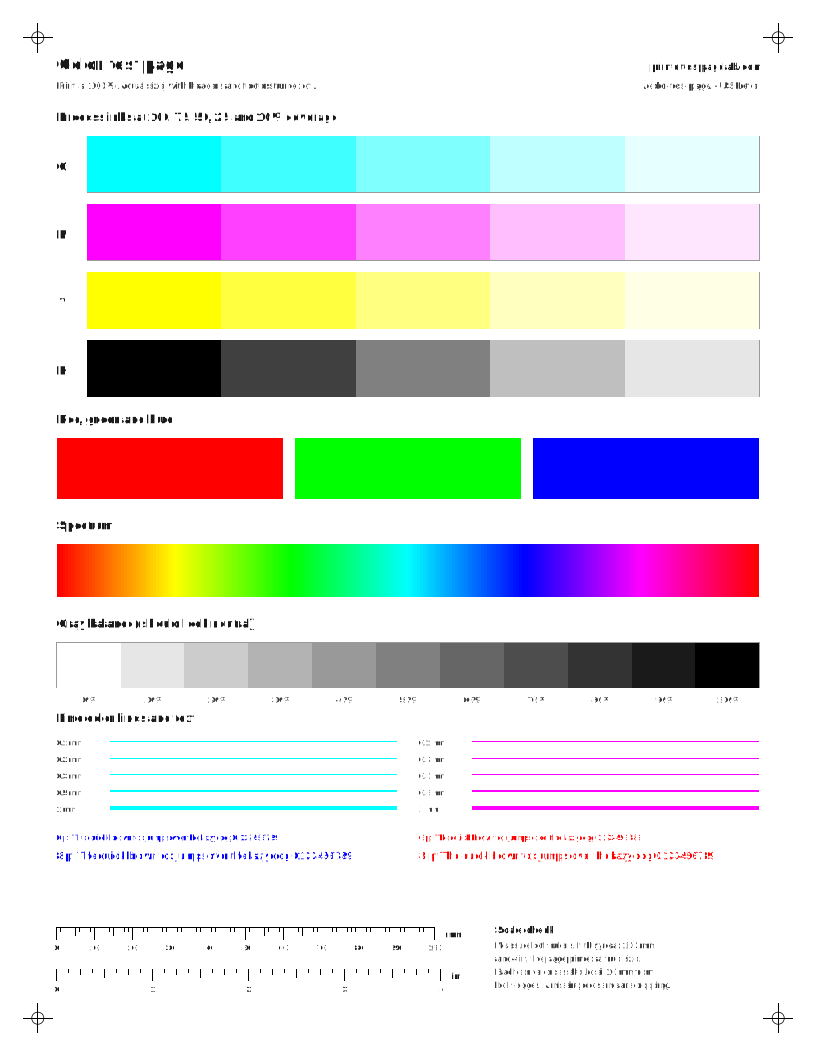
All four process inks at five coverage levels, plus RGB, a spectrum, a gray balance ramp and fine color text.
Moderate ink · Print it online
Black and white test page
Gray step ramp, a solid black block, line weights and text from 4 to 14 pt.
Moderate ink · Print it online
CMYK color bars
One column per ink with 11 coverage steps, plus red, green and blue. Shows which ink is weak at a glance.
Moderate ink · Print it online
Nozzle check grid
A staircase of fine lines and a solid block for each ink. Gaps and white lines show which color is clogged.
Light ink · Print it online
Alignment test page
Long vertical lines, a fine grid, color registration crosses and diagonals for checking head alignment.
Light ink · Print it online
Ink-saver color check
Small patches of every ink, short ramps, fine lines and text. A full health check that uses very little ink.
Light ink · Print it online
Photo test print
A public-domain NASA crew portrait with a range of natural skin tones, plus skin-tone patches and a neutral gray ramp.
Heavy ink · Print it online
Color printer test page PDF
CMYK and RGB charts, single-color sheets and photo-ink ramps for checking each ink on its own. In British English this is the colour test page PDF; the sheets are the same.
RGB color chart
Red, green, blue and their mixes across a hue and lightness grid. Good for judging how your printer maps screen colors.
Moderate ink · Print it online
Cyan test page
Only cyan ink: a solid block, a coverage ramp, fine lines and text. Checks one channel without wasting the others.
Moderate ink · Print it online
Magenta test page
Only magenta ink: a solid block, a coverage ramp, fine lines and text. Checks one channel without wasting the others.
Moderate ink · Print it online
Yellow test page
Only yellow ink: a solid block, a coverage ramp, fine lines and text. Checks one channel without wasting the others.
Moderate ink · Print it online
Black test page
Only black ink: a solid block, a coverage ramp, fine lines and text. Checks one channel without wasting the others.
Moderate ink · Print it online
Red test page
Red built from two inks. If it looks wrong, print the single-ink pages to find which one is weak.
Moderate ink · Print it online
Green test page
Green built from two inks. If it looks wrong, print the single-ink pages to find which one is weak.
Moderate ink · Print it online
Blue test page
Blue built from two inks. If it looks wrong, print the single-ink pages to find which one is weak.
Moderate ink · Print it online
Rainbow test page
Full-width spectrum bands that use every ink at once. A quick visual check that all colors fire.
Heavy ink · Print it online
Tri-color cartridge test
Cyan, magenta and yellow on their own and mixed, for printers with a single tri-color cartridge.
Moderate ink · Print it online
Photo printer light-ink test
Light tints and long ramps where photo printers switch to light cyan, light magenta and gray inks.
Moderate ink · Print it online
Black and white printer test page PDF
Gray ramps, solid black, fine text and a full page of document text.
Light-ink black and white page
A low-coverage version with no solid blocks. Checks sharpness and gray steps while using very little ink.
Light ink · Print it online
Grayscale ramp
A smooth gray gradient, a 21-step ramp and four large neutral patches for spotting color casts.
Moderate ink · Print it online
Fine text sheet
Sans, serif and monospace text from 4 to 14 pt, plus white text on black. Shows sharpness and fill-in.
Light ink · Print it online
Full text page
A full page of 10 pt body text, like a typical document. Shows faded lines, gaps, smudges and skew across a real page of text.
Light ink · Print it online
Diagnostic PDF test pages
Solid fills, line pairs, gradients, alignment and size checks for finding a specific fault.
Solid fills
Eight large solid blocks. Banding, streaks and uneven coverage show up clearly on big flat areas.
Heavy ink · Print it online
Resolution and line pairs
Line-pair groups from 0.5 to 4 lines per mm in both directions, plus a starburst for resolving detail.
Light ink · Print it online
Gradient banding test
Smooth ramps for every ink and a full spectrum. Banding or steps in a ramp show feed or nozzle trouble.
Moderate ink · Print it online
Print size and margin check
Long rulers, a 100 mm square and edge scales. Measure them to find out if your printer shrinks, stretches or shifts the page.
Light ink · Print it online
Nozzle check and cleaning PDFs
Nozzle grid, purge sheets and the low-ink maintenance strip for inkjets.
Purge sheet: cyan
Five solid cyan bands that pull fresh ink through the cyan channel only.
Heavy ink · Print it online
Purge sheet: magenta
Five solid magenta bands that pull fresh ink through the magenta channel only.
Heavy ink · Print it online
Purge sheet: yellow
Five solid yellow bands that pull fresh ink through the yellow channel only.
Heavy ink · Print it online
Purge sheet: black
Five solid black bands that pull fresh ink through the black channel only.
Heavy ink · Print it online
Purge sheet: all colors
Full-height columns of cyan, magenta, yellow and black to push fresh ink through every channel.
Heavy ink · Print it online
Ink-saver maintenance strip
Prints the 20-cell grid and fills cell 1. Feed the same sheet back each week to print the next cell.
Light ink · Print it online
Laser printer test page PDF
Uniformity, ghost detector, repeat-defect and blank sheets for toner printers.
Blank page
Nothing but the edge rulers. On a laser printer, any toner in the empty area is background, spots or streaks from the drum or rollers; on any printer it checks paper feed.
Light ink · Print it online
Laser uniformity page
Full-width black, gray and light-gray fields. Vertical streaks, light bands and specks show clearly.
Heavy ink · Print it online
Laser ghosting test
Black shapes at the top and a light gray field below. Faint copies of the shapes in the gray area are ghosting.
Moderate ink · Print it online
Repeat-defect measuring page
A light tint field with a millimetre scale down the side. Measure the gap between repeating marks.
Moderate ink · Print it online
Color laser repeat-defect set
Four full pages at 40% cyan, magenta, yellow and black, with a millimetre scale. Marks that repeat show up in the color that causes them.
4 pages · Heavy ink · Print it online
Ghost detector (ghosting and drum test)
Page 1 prints solid text in each color. Page 2 prints boxes in the same spots: a 40% fill shows drum refresh problems, an empty outline shows ghosting.
2 pages · Moderate ink · Print it online
Photo test print PDF
Photographs with skin tones and color scenes for judging photo quality.
Color photo test print
Two public-domain market photos with saturated fruit colors, white signs, deep shadows and fine texture.
Heavy ink · Print it online
How to print a PDF test page at actual size
- Download the PDF test page for the paper you use: US Letter in North America, A4 almost everywhere else.
- Open it in your browser or PDF viewer and choose Print.
- Set the scale to Actual size or 100%. Turn off Fit to page, Shrink oversized pages and borderless printing.
- Print, then measure the 100 mm and 4 in rulers. If they match, the PDF printed at true size. If not, the print size checker tells you exactly what scale was used.
Which PDF test page should I print?
- Checking a printer in general: the color printer test page PDF in the all-in-one section, or the color test page online.
- Saving ink: the ink-saver sheet, which uses small patches of every color.
- A clogged inkjet: the nozzle check PDF, then read it with the nozzle check reader.
- A laser printer: the uniformity page, the ghost detector and the blank page; see laser streaks to interpret them.
- Black ink only: the black and white test page or the full text page.
PDF test page or print online?
The PDFs and the online pages are the same sheets. Printing online from the printer test page tool is one click and chooses Letter or A4 for you. A PDF test page is better when you print from another computer, a phone or a USB stick, when you print later, or when you want to keep a reference sheet to compare against next month.
Printer test page PDF for HP, Epson, Canon and Brother
These PDFs work on any inkjet or laser printer, because they only ask the printer to print. Brand-specific checks such as an HP print quality report or an Epson nozzle check come from the printer itself. The HP, Epson, Canon and Brother pages show how to print those for your model.
Questions people ask
Is there a free printer test page PDF?
Yes. Every test page on this site is a free PDF in US Letter and A4, with no sign-up: 39 sheets in all, from a full color test page to nozzle checks and laser tests. Download one sheet, or all of them in a single ZIP file.
How do I print a test page PDF?
Open the PDF in your browser or a PDF viewer, press Print, and choose Actual size or 100% scale, not Fit to page. Pick the paper size you loaded. Then measure the printed 100 mm ruler: if it measures 100 mm, the page printed at true size.
What is a color printer test page PDF?
A PDF with blocks of cyan, magenta, yellow and black, plus mixed colors, gradients and text. Printing it shows whether every ink fires: a missing or pale block points to an empty cartridge or clogged nozzles for that color.
Why does my PDF test page print smaller than it should?
The PDF viewer or print dialog is scaling it, usually with Fit to page or Shrink oversized pages. An A4 PDF fitted to Letter paper prints at about 94%. Choose Actual size, match the paper size, and check with our print size checker.
Should I use the PDF or print from the browser?
Either works. Printing from the browser is one click and picks your paper size automatically. The PDF is better for printing later, from another computer or a phone, or for keeping a reference sheet to compare against.
Related
- Printer test pagePrint any sheet in one click, no download.
- Color test pageCMYK, RGB and single-color sheets.
- Black and white test pageGray ramp, solid black and sharp text.
- Print size checkFind out if your PDF printed at true size.
- How to print a test pageWindows, Mac, ChromeOS, Linux and printer buttons.
- Nozzle check readerTap the gaps in your pattern to get a verdict.