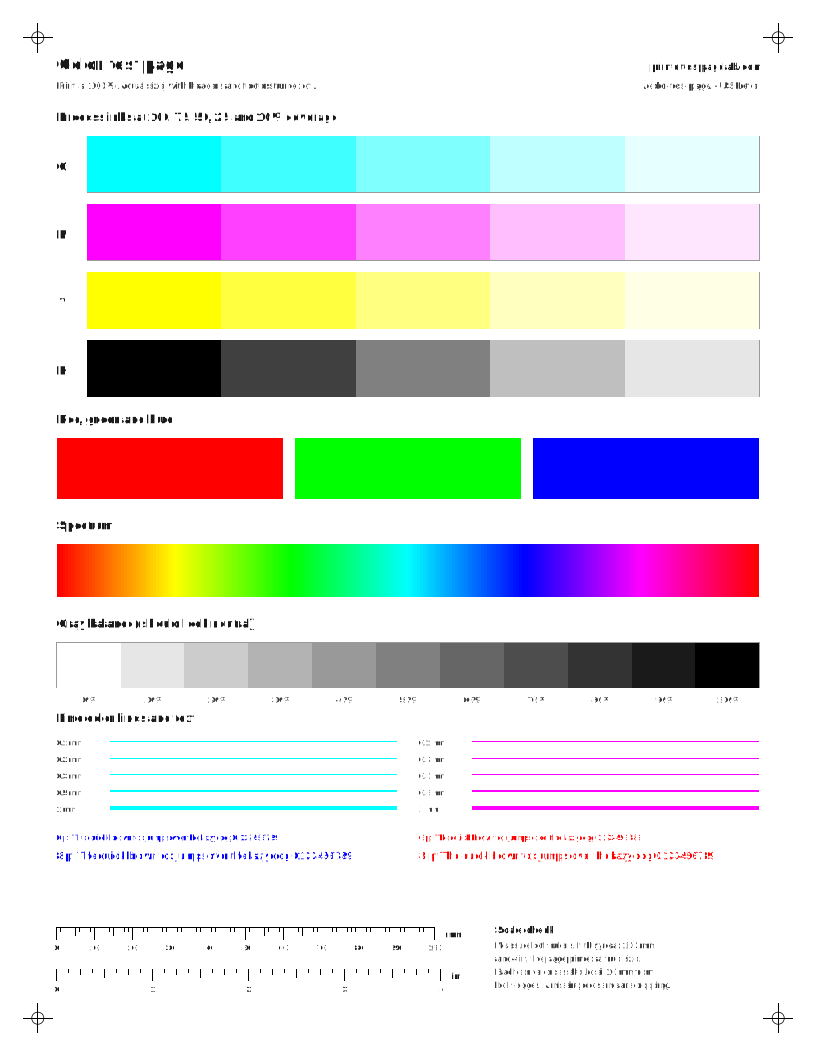
Whether you call it a color test page, a test print page in color, or (in British English) a colour print test page, it is the same check: every ink printed in known amounts so a weak one stands out.
What is a CMYK test page?
A CMYK test page prints cyan, magenta, yellow and black, the four process inks in most color printers, in separate rows or columns.[1] A weak or blocked ink then shows up in one place. The full color sheet here prints each ink at 100, 75, 50, 25 and 10% coverage, then adds red, green and blue blocks, a spectrum and a gray balance ramp in 10% steps. For a quicker CMYK test print, the CMYK bars sheet sets the four inks side by side in 11 coverage steps each. Red, green and blue each need two inks, so they act as a cross-check: red that looks pink usually means weak yellow, and red that looks orange usually means weak magenta.[2] The gray ramp is the most sensitive part, because many color printers mix gray from all three colors, so a small imbalance shows as a pink, green or blue cast.[3][4] If one row is pale or striped, run a nozzle check for that color next. To print later or from another device, download a color printer test page PDF in Letter or A4.
How do I read a color test page?
Go row by row through your color test print. Each of the C, M, Y and K rows should fall off evenly from solid to 10%. Then check the gray balance ramp: on many color printers the grays are mixed from all three colors, so a tint there means one ink is weaker than the others.
- Thin white lines across one color: partly clogged nozzles in that color.[5][6]
- One row much paler than the others: low ink, or that color is not reaching the head.[7]
- Every row pale: draft or economy mode, or the wrong paper type setting.[8][5]
- Colors in the wrong place or doubled edges: the head needs aligning. Print the alignment test page to confirm.[9]
What counts as a pass?
A healthy printer passes every row of this table on plain paper in normal quality mode. Draft mode and the wrong paper type setting can make a good printer fail the tint checks.[8][5]
| Part of the sheet | Pass | A fail usually points to |
|---|
| C, M, Y and K rows | All five steps visible, including the 10% tint | A pale row or missing light step: that ink is low or not reaching the head[6] |
|---|
| Solid 100% blocks | Even color with no white lines | Thin white lines across one color: partly clogged nozzles (printing lines)[5] |
|---|
| Red, green and blue | Clean, saturated hues | A shifted hue: one of the two inks it needs is weak[2] |
|---|
| Gray balance ramp | Neutral gray from light to dark | A pink, green or blue cast: one color is printing weak or strong[3] |
|---|
| Spectrum | Smooth flow with no hard bands | A dull stretch or gap: the ink that hue depends on |
|---|
| 100 mm ruler | Measures 100 mm | Shorter: the page was scaled; set 100% or Actual size |
|---|
Which single-color or rainbow sheet should I print?
Print a single-color sheet when you already suspect one ink. The yellow printer test page, for example, prints a solid yellow block, a ramp from 100 to 10%, fine lines and text in yellow ink alone, so you check that cartridge or tank without spending the others. The magenta printer test page and the cyan and black pages work the same way. The red, green and blue sheets each use two inks, so they help when a mixed color looks wrong. The rainbow printer test page is the opposite: full-width spectrum bands that use every ink at once. It is a quick visual check that all colors fire, but it uses a lot of ink. Epson suggests printing at least one color test page a week to keep ink flowing,[10] and the ink saver sheet is the better choice for that weekly check.
CMYK or RGB: which test page should I print?
Print the CMYK sheets to check the hardware. They map closely to the inks in the printer, so a fault shows up in one place.[1] Print the RGB chart, a printer color chart of hues at several lightness levels, when the hardware looks fine but photos or slides come out with the wrong colors. It shows how your printer converts screen colors from light into ink,[11] which depends on the driver and paper settings.[12] For real-world color, print the photo and market test prints on the paper you actually use.
Why does the test page look right but one program prints the wrong colors?
Usually because that program is managing color itself, and a color chart can’t fix that. Check its print settings for options like “Printer manages colors” or a color profile. Epson notes that results are usually better when one place, normally the program, manages color,[13] and that turning color management on in both the program and the driver can print lighter than expected.[14] The documents vs test page guide covers app settings in more detail.